Visual Scheduler
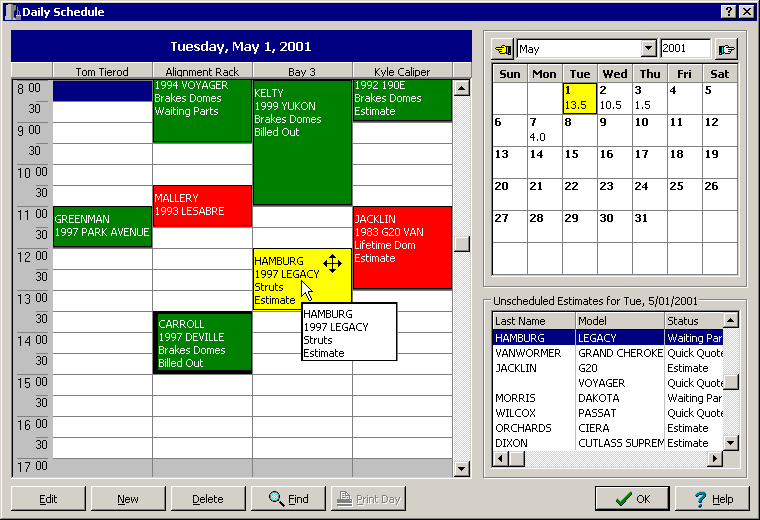
The StockTrac Enterprise Scheduler is more than a simple appointment book; it provides a visual color-coded overview of who, where and the type of service going on in the shop. By assigning Color Codes to each service type, and by having the flexibility of naming the slots either by bay, technician or both, gives you the ability to manage and schedule your time more efficiently. Scheduling appointments is a lot easier when you have this information visually displayed.
To schedule an Estimate simply highlight the Unscheduled Estimate that you want scheduled (lower right-hand corner of the screen) then, using your mouse, hold down the left-button and drag the Estimate to the desired time slot on the Daily Schedule, then release the button. Once the work is scheduled, you can click on a job and drag the borders up or down to decrease or increase the length of the appointment. You can also drag it to another Bay/Technician or even move the appointment to another day and time!
Revised May
25th, 2001
Copyright � 2001 by:
Janco International, Incorporated
All Rights Reserved Worldwide
StockTrac� EZCards�
and TechLink� and are registered
Trademarks of Janco International, Inc.
All Rights Reserved Worldwide