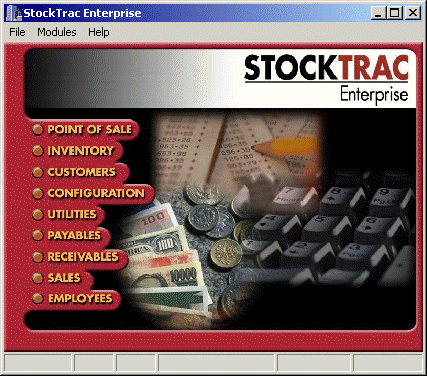
Janco programmers have been hard at work for the past several years developing what we feel will be the most versatile 32-Bit Windows program yet for the day-to-day management of a 21st century Undercar Shop. The point-of-sale module, as with the other modules, has been developed with all the functionality that has existed in all previous DOS versions of StockTrac�.
The following is just a small sampling of some of the features and benefits that we feel will provide shop owners and managers with an outstanding point-of-sale, shop management system:
- True 32-Bit & Written in C++ � � StockTrac�, like most high-quality commercial software, is authored in the C++ language. Does it matter? Absolutely! C++ provides the uncompromising speed, efficiency and scalability when dealing with tens-of-thousands of inventory items, estimates, invoices, etc. Prototyping languages such as Visual Basic� and Access� just don't have the horsepower to do the job. That's why operating systems like Windows 2000 and commercial software like Microsoft Excel and Microsoft Word are written in C++. Time is money, and spending your time waiting for your software to run your business is not time well spent.
- Industry Standard SQL � StockTrac� utilizes an SQL database that is compiled directly into the software Plus, its blazingly fast, with over 20,000 part number queries in less than a minute! In addition, it provides outstanding performance using existing Windows 95/98/2000 networks. By eliminating the need for a dedicated Windows NT/2000 Server network, and with no additional database engines to purchase, or maintain, there is a significant reduction in total cost-of-ownership as well as network administration expense.
- Duplex Printing � StockTrac� supports the latest Okidata 20DX LED Pageprinter with its ability to "duplex print", i.e., printing on both sides of plain paper for creating Estimates, Invoices (with coupons on the back)
- Labor Guides / Maintenance Schedules � StockTrac� is fully integrated with Mitchell-on-Demand�, All-Data� , Real Time Labor Guides� as well as the maintenance schedules offered by Mitchell� and Chek-Chart�. Labor times and maintenance schedules selected in these guides are automatically integrated into the Estimate and Invoice.
- Web Enabled Updates � All StockTrac� users participating in the technical support program will have the ability to update files and programs with a single click on the Update StockTrac� icon. This icon will automatically connect to Janco�s web page which will then check the customer�s installed programs and update those which have changed. Will support the transfer of data to/from remote shops to Hubs via internet communications.
- On-Line Help

- Global Reporting
- Uses multiple profiles that you can define for managing your inventory
- Design your own reports with the data you want to see in the order you want to see it
- Makes thousands of price changes or other inventory changes a minute
- Global profiles can automatically generate reports on certain days when used in conjunction with Task Scheduling
- You can "lock out" those sensitive report profiles from unauthorized personnel
- Once a profile is designed, it can be saved to be used again and again, by you or someone else. Your own personal report generator
- Can compare one field to another
- Can set one field equal to another
- A single global pass can make multiple changes to a field such as �Set Selling Price 3 Equal To List Price,� then �Increase Selling Price 3 By $10.00�
- Point and click to setup a global profile
- Configure your new price installations with profiles to quickly install them without having to answer the same questions each time
- Generate new prices at your hub shop quickly for distribution to remote shops by diskette or telephone modem. Use the Midas� Direct new price diskettes or other vendor pricing diskettes provided by Janco
- New Prices can be installed at remote shops automatically, based on the installation profile you design, without any user intervention
- New Prices can be automatically installed at any date or time when used in conjunction with Task Scheduling
- Integrated Accounts Receivable
- Track Customer Charges and Payments
- Charge invoices are tracked for each account
- Check charge account status at any time
- Print account statements at any time
- Each customer has a special "notes" screen where unlimited notes can be written and updated by user
- Generate multiple current status and history reports for all receivables transactions
- Entering Transactions
- Charges and payments can be created directly at the point-of-sale
- Adjustments can be entered directly in the receivables module without affecting daily sales and cash
- "Early payment discounts" can be entered in the receivables module directly
- Option to enter adjustments into a temporary "batch" file. This allows entries to be made without affecting the account status until the file is posted, which can occur at any time you choose
- Apply any open payments on account that were not applied directly to a specific charge invoice
- Un-apply any payments that may have been applied to an invoice incorrectly
- All transactions are kept in history. Multiple Reports can be generated based on account history
- Service Charges
- Ability to flag each receivable account to allow or disallow service charges
- Select the number of days past due, percent rate, minimum finance charge amount, and minimum balance past due for creating service charges
- Create a list of service charges to be posted with the option to delete any charges in the list before posting to the accounts
- Date when service charges were last posted appears before charges are calculated
- List of service charges to post can be printed before posting occurs.
- Posted service charges can be waived with a button click, while a record of the waived charge is retained in the history file
- Credit Hold Warnings
- Each receivable account can be designated "credit hold" status.
- Credit hold warning will appear at Point-of-sale before allowing any charges
- View/ Edit/ Print list of accounts on credit hold for quick updating or collection calling
- Credit hold warnings could optionally be used in conjunction with the customer notes field as a "special instructions" warning as well
- Accounts Payable / Suppliers - Supplier Maintenance
- Add / Edit supplier�s information, including billing and shipping representatives and user�s account number with each supplier
- Setup ship to lead days for each supplier to show lead-time when creating an order
- Each supplier has a special "notes" screen where unlimited notes can be written and updated by user
- Suppliers Product Lines & Discounts
- Setup product lines (called "manufacturers" by our system) that each supplier carries
- Select which supplier is your preferred supplier for a manufacturer
- Setup a discount profile for each manufacturer that your supplier carries.
- Purchasing discounts can be set up as either a flat rate dollar
amount or a percentage discount for each product code within the
manufacturer�s product line. (i.e. Manufacturer = XYZ Brand
Brakes, Product code = Brake Shoes can all be applied a 10%
discount.)
- Tracking Orders, Outside Purchases, Supplier Invoices
- Supplier invoices can be entered pulling items from posted stock orders, or from outside purchases information
- Non-stock orders and supplier information can be entered as well, allowing the Suppliers module to behave like a "mini accounts payable system"
- Detailed history will be kept on all supplier invoices, allowing for multiple reports to be generated on parts ordering and pricing for each supplier over any period of time
- Adjustments and credits can be entered and tracked in the system
- Making Payments
- Payments are entered in an easy list style format
- Payment lists can be filtered to show bills due by a specific date, and can be sorted by due date, supplier id number, or by an early payment discount date
- Early payment discounts available are calculated within the list allowing a comparison of the total invoices due versus the total due after discounts. Taking a discount is as simple as clicking the mouse
- Payments have a field for a check or reference number. Multiple reports can be created for check tracking
- Payments will also have a field for reconciled options, allowing for an option to reconcile check numbers and amounts entered against a bank statement
- Tracking Core Returns
- Used cores on hand for each product code can be entered into core returns. This would reset the number of used cores on hand to zero in inventory and the system will again begin accumulating used cores for any sales from this point
- The newly created core returns will be tracked by the system. When the credit acknowledgment is received from the supplier, it can automatically be converted to a credit memo and applied against any supplier invoice, making any discrepancies easy to catch
- Customer Data Management
- Unlimited number of user specified reports can be created based on any aspect of a customer�s information and history. These reports can be saved into a reusable report profile
- Results can be printed in a report, used to create post card or form letters
- Body text of form letters and post cards can be imported from other documents like Microsoft word, or can be created through StockTrac�
- Graphics and color are supported if your printer supports them. The text can be stored to a separate file that can be used in other profiles or by other word processing programs
- Inventory Ordering
- Generate orders for multiple shops in one pass
- Easy to use Order Profiles can be customized and then reused for specific order requirements
- Order by product code, sale code, popularity code, a combination of these, or even ignore certain popularity codes when generating the order
- Post by exception; compare the packing list with the order and post the entire order with a click of the mouse
- Generate Low-Stock reports, Overstock reports, Fill-in orders
- Custom design the order printout with the information you want to see
- A Complete System � All shop management functionality is available either at the hub level, at the remote shop, or shared between locations. Orders can be generated, daily reports can be run, data transmitted from any location. No extra charge for programs for a back office system.
- Legendary Technical Support � Janco has an industry-wide reputation for unparalleled customer service. Ninety-eight percent of all technical support questions are solved at the time of the call. Janco always goes that extra mile to insure complete customer satisfaction.
Revised December 18th, 2003
Copyright � 2001 by:
Janco International, Incorporated
All Rights Reserved Worldwide
Midas� and MidasLink� are Registered Trademarks of Midas
International Corporation
Visual Basic� and Access� are Registered Trademarks of
Microsoft Corporation
StockTrac� EZCards�
TrueNetworking� and TechLink� and are registered
Trademarks of Janco International, Inc.
All Rights Reserved Worldwide